
Variphy has a purpose-built ability to providing long lasting data storage, reporting and analytics for CUCM Clusters which are offline or decommissioned, especially for compliance or other data retention requirements.
We often see this with customers who need ongoing access to historical CUCM data after server decommissioning and are:
- Migrating from CUCM to cloud-calling solutions (e.g., Webex, Microsoft Teams, Zoom)
- Consolidating or re-building clusters
- Require historical data or configuration checks from decommissioned CUCM servers.
Decommissioned CUCM Cluster Support in Variphy
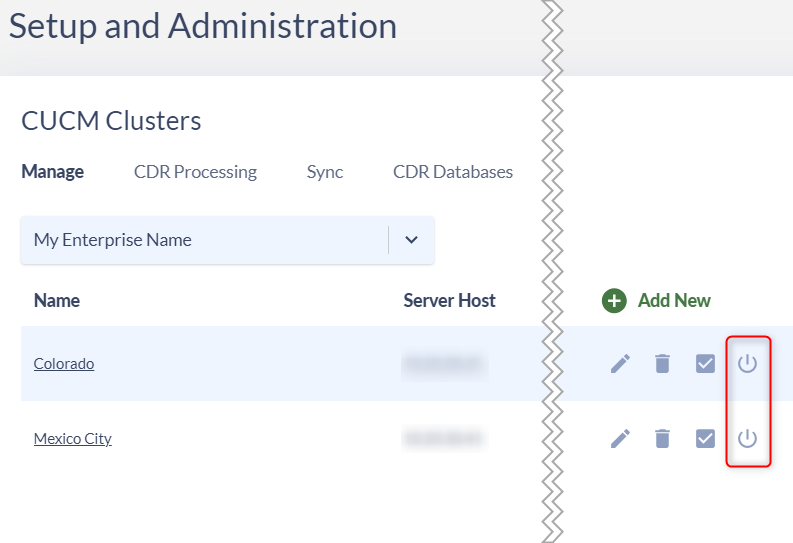
The “Manage” tab on the CUCM Clusters page in Variphy Administration provides a “Decommission CUCM Cluster” action for each Cluster, as highlighted in the following screenshot:
How To Request a CUCM Cluster Decommission in Variphy:
Click the “Decommission CUCM Cluster” option for the desired CUCM Cluster on the “Manage” tab in Variphy – this will open a modal window.
The resulting modal window will display the Cluster Identifier and Cluster Name with instructions for where to submit the information to request decommissioned use of the Cluster.
It will also provide the Cluster’s Last Successful Sync data (if any) and recommend performing a “final sync” before decommissioning. If there is no existing sync data, it will state that there is currently no CUCM data synced.
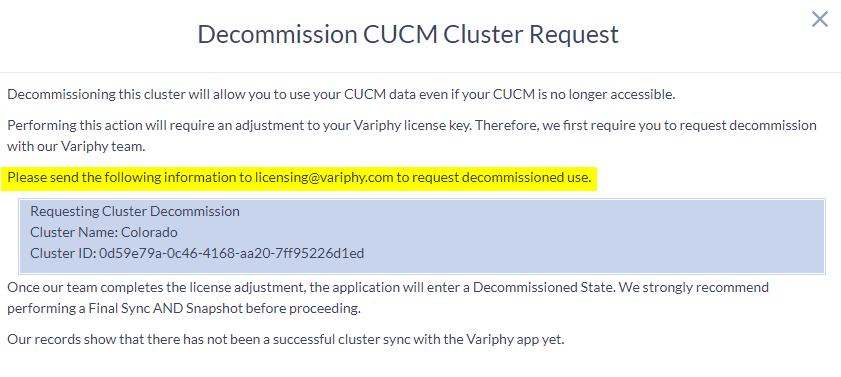
Variphy will process the decommission request and provide an updated license which marks the requested CUCM Cluster as decommissioned.
Understanding Available Features
Once a CUCM Cluster is decommissioned in Variphy, it is licensed differently and has limited feature availability in Variphy.
Users can access the following with for a decommissioned CUCM Cluster:
- CUCM Call Analytics Reporting
- Dashboards
- Existing Snapshots (cannot run new ones)
- As-Built Reports (only against existing Snapshots)
- Comparisons
- Database Archiving
- CDR Multi-Database Support
User can no longer access or perform the following for decommissioned CUCM Cluster:
- Remote Phone Control
- Macros
- Broadcast
- DN & DID Management
- Real-Time Hunt Pilot Status and Real-Time Phone Registration Widgets
- Log Analysis in Change Management.
Manage Report Scheduling
Note that scheduled reports will automatically disable when a cluster is decommissioned.
Handle Purge Scheduling
Be aware that scheduled purging will automatically disable for decommissioned clusters, including:
- CDR Purging.
- DB Purging (except for accessing and managing schedules).
For Snapshot Purge/Clean Up:
Navigate to Change Management > Snapshots > Schedule Snapshots > Clean Up
Additional Considerations
- Ensure all necessary historical data is synced and snapshots are taken before decommissioning.
- Regularly review your data retention needs and adjust accordingly.
Still Need Help?
Email our support team at support@variphy.com or click the button below to access our ticket portal.
Please provide details about your question or issue, including any applicable screenshots, reports, or Variphy application log files.
